Getting Started with Trove
2017/10/27
DBaaS
定义
- 以服务的形式向用户提供数据库
- “按需” 提供数据库服务器
- 规定服务器的规格
- 在复杂的拓扑结构中配置数据库服务器/组
- 自动化管理数据库服务器/组
- 在系统负载响应时自动提供缩放数据库的能力,并动态优化配置配置基础设施资源的利用
好处
- 易于提供
- 一致性的配置
- 自动化操作
- 自动缩放
- 提高开发的灵活性
- 更好的资源利用和设计
- 对于提供者或者操作者简化角色
DBaaS Providers
- Amazon RDS
- Amazon Redshift
- Azure SQL Database
- Google Cloud SQL
- Amazon DynamoDB
- OpenStack Trove
OpenStack Trove Overview
Trove is the openstack database-as-a-service project to provide scalable and reliable cloud database as a service provisioning functionality for both relation and non-relation database engines, and to continue to improve its fully-featured and extensibles open source framework.
Integrated in the IceHouse release(2014)
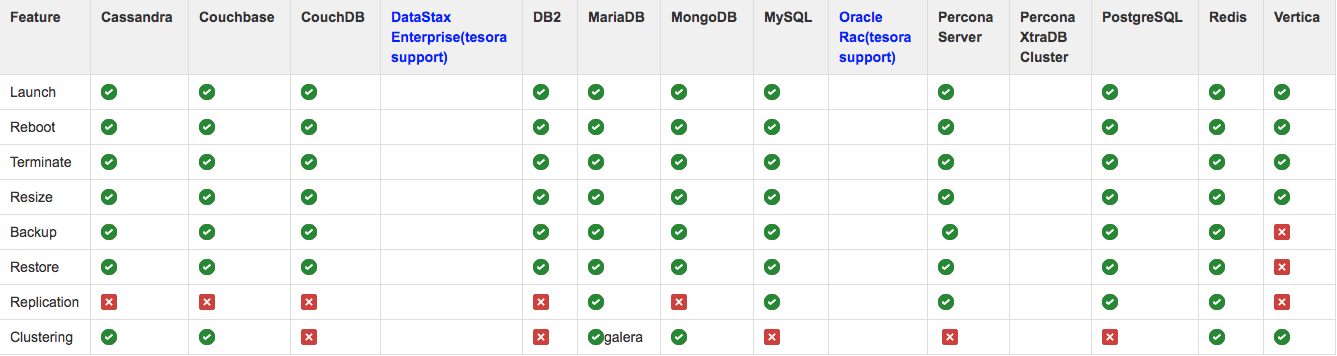
Supports a dozen databases
cassandra, counchbase, couchDB, DB2 EXpress-C, MariaDB, MongoDB, Mysql, Percona, Percona XtraDB Cluster, PostegreSQL, Redis, and Vertica
complete datastore lifecycle management
provision
manage
secure
tune
Trove 架构
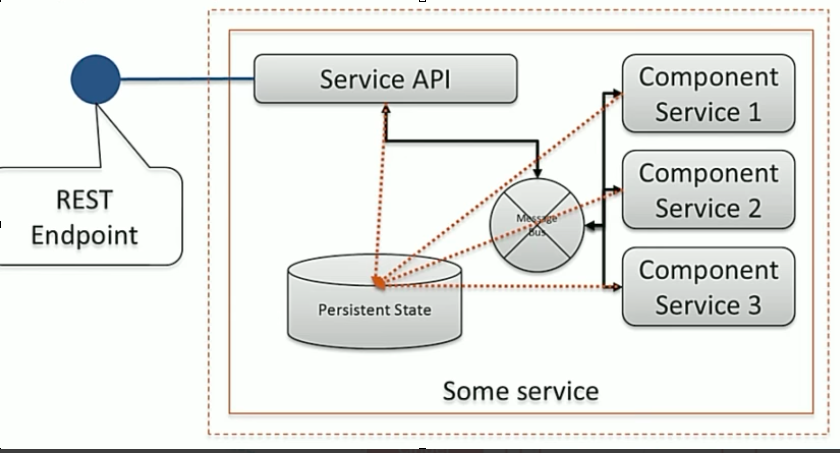
A typical openstack service architecture
Trove architecture
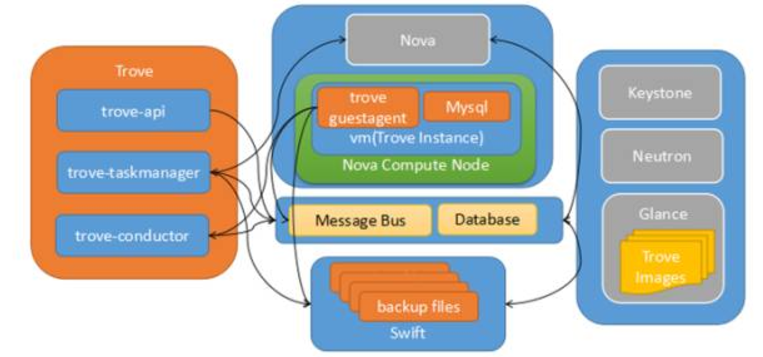
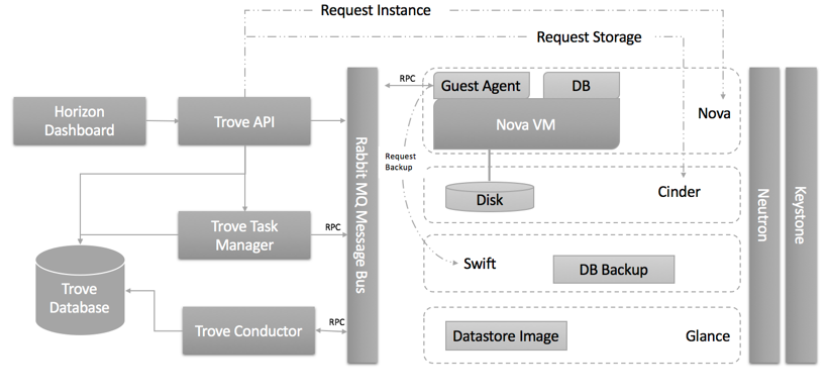
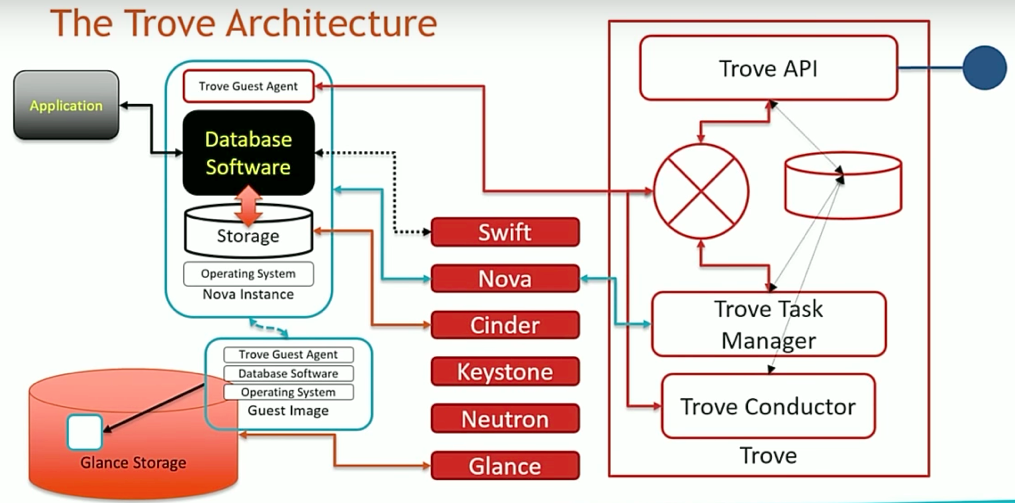
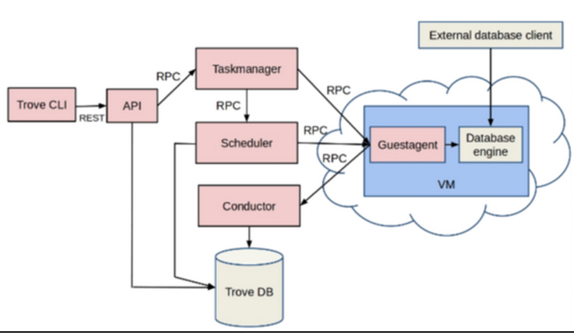
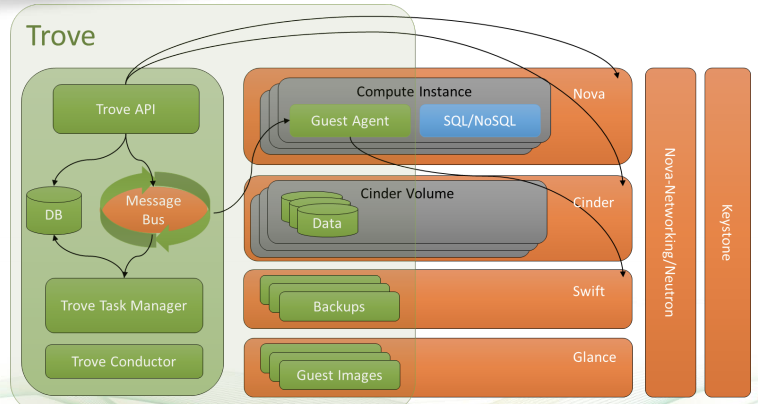
Trove components
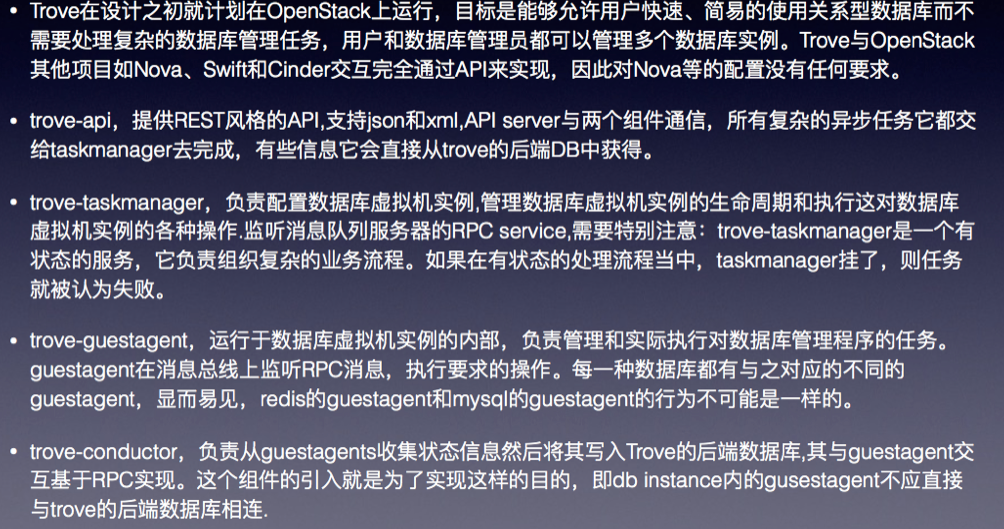
High level description
Trove is designed to support a single-tenant database within a Nova
instance.
There will be no restrictions on how Nova is configured, since Trove
interacts with other OpenStack components purely through the API.
Trove API
提供 Restful api 服务
Trove-taskmanager: 执行繁重的工作:部署instance、管理instance的生命周期、对数据库实例执行操作
Trove-guestagent: 在guest instance 中运行的服务,监听 RPC 消息队列(监听一个特定的topic,名字为instance的id)
Trove-conductor: 监听 RabbitMQ 的 topic,负责接收guest instance的消息,然后更新数据库。
Trove-dashboard: Web UI: https://github.com/openstack/trove-dashboard
DatastoreCompatibilityMatrix
Trove 术语
name                         description
datastore	                  数据库类型
datastore_version	          数据库版本
database instance	          实例
database	                  数据库(eg, mydb)
replication instance	      副本实例
backup                        实例备份
users	                      用户
configuration groups	      数据库配置组
cluster	                      数据库集群
modules                       [module-management]  module 代表可以应用到instance 上的功能,比如licences 管理,软件激活, 第三方软件配这些在trove 中称之为module 管理。在trove.conf中需要定义支持的module_types =ping ,module type和moduleDrive相对应。
                              [module-mangement-ordering]
                              module 还支持顺序,通过指定模块的顺序,来控制其在instance上执行的顺序。
                              目前支持2个drive:(setup.cfg)
                                trove.guestagent.module.drivers =
                                    ping = trove.guestagent.module.drivers.ping_driver:PingDriver
                                    new_relic_license = trove.guestagent.module.drivers.new_relic_license_driver:NewRelicLicenseDriver
logs                          datastore-log-operations.html
                            https://review.openstack.org/#/c/250590/23
                            https://review.openstack.org/#/q/topic:bp/datastore-log-operations,n,z
                            在datastore中可以定义用户可以获取到的instance上的log,(比如system log 或者MySQL 慢查询 Log,需要enable)用户可以获取guestagent上的这些log,通过log-publish命令保存到swfit,以供enduser查看。
quota                       每个tenant 下的quota配置,包含:backups,instances,volumes的数量。
                            [root@allinone ~]# trove quota-show admin
                            +-----------+--------+----------+-------+
                            | Resource | In Use | Reserved | Limit |
                            +-----------+--------+----------+-------+
                            | backups | 0 | 0 | 5 |
                            | instances | 0 | 0 | 5 |
                            | volumes | 0 | 0 | 100 |
                            +-----------+--------+----------+-------+
metadata                    → not support
                            指的是instance的 metadata(元数据)此bp与2014年的时候开发,但是最终code没有进去。
                            https://blueprints.launchpad.net/horizon/+spec/trove-metadata-support
                            https://blueprints.launchpad.net/trove/+spec/trove-metadata
                            https://review.openstack.org/#/c/82123/
                            https://etherpad.openstack.org/p/trove-kilo-sprint-metadata
                            https://wiki.openstack.org/wiki/Trove-Instance-Metadata
volume_type
flavor

security-group
实例状态
class ServiceStatuses(object):
    RUNNING = ServiceStatus(0x01, 'running', 'ACTIVE')
    BLOCKED = ServiceStatus(0x02, 'blocked', 'BLOCKED')
    PAUSED = ServiceStatus(0x03, 'paused', 'SHUTDOWN')
    SHUTDOWN = ServiceStatus(0x04, 'shutdown', 'SHUTDOWN')
    CRASHED = ServiceStatus(0x06, 'crashed', 'SHUTDOWN')
    FAILED = ServiceStatus(0x08, 'failed to spawn', 'FAILED')
    BUILDING = ServiceStatus(0x09, 'building', 'BUILD')
    PROMOTING = ServiceStatus(0x10, 'promoting replica', 'PROMOTE')
    EJECTING = ServiceStatus(0x11, 'ejecting replica source', 'EJECT')
    LOGGING = ServiceStatus(0x12, 'transferring guest logs', 'LOGGING')
    UNKNOWN = ServiceStatus(0x16, 'unknown', 'ERROR')
    NEW = ServiceStatus(0x17, 'new', 'NEW')
    DELETED = ServiceStatus(0x05, 'deleted', 'DELETED')
    FAILED_TIMEOUT_GUESTAGENT = ServiceStatus(0x18, 'guestagent error',
                                              'ERROR')
    INSTANCE_READY = ServiceStatus(0x19, 'instance ready', 'BUILD')
    RESTART_REQUIRED = ServiceStatus(0x20, 'restart required',
                                     'RESTART_REQUIRED')
使用流程
build image,upload to glance
if use devstack image,need to modify the configuration files in image and then upload to glance.
# glance image-create --name mysql-5.6 --disk-format qcow2 --container-format bare < ./mysql.qcow2
配置数据库类型和数据库版本
# trove-manage datastore_update mysql ''
Datastore 'mysql' updated.

# trove-manage datastore_version_update  mysql mysql-5.6 mysql fb380f03-d1ac-41bc-b566-b6fc700f27b3 '' 1
Datastore version 'mysql-5.6' updated.

// 设置默认datastore
在trove.conf 中设置:
defaule_datastore = mysql
修改之后需要重启trove服务。

//设置数据库默认版本
trove-manage datastore_update mysql 5.5

// 设置datastore flavor

trove-manage datastore_version_flavor_add
usage: trove-manage datastore_version_flavor_add [-h]
                                                 datastore_name
                                                 datastore_version_name
                                                 flavor_ids
trove-manage datastore_version_flavor_add: error: too few arguments
(trove) [root@trove-dev trove(keystone_admin)]# trove-manage datastore_version_flavor_add percona-dev 5.6.33 3,4
Added flavors '3,4' to the 'percona-dev' '5.6.33'.
(trove) [root@trove-dev trove(keystone_admin)]# trove flavor-list --datastore_type percona-dev --datastore_version_id 5.6.33
+----+-----------+-------+-------+------+-----------+
| ID | Name      |   RAM | vCPUs | Disk | Ephemeral |
+----+-----------+-------+-------+------+-----------+
| 3  | m1.medium |  4096 |     2 |   40 |         0 |
| 4  | m1.large  |  8192 |     4 |   80 |         0 |
| 7  | 2C8G      |  8192 |     2 |   80 |         0 |
| 8  | 16C32G    | 32768 |    16 |  160 |         0 |
+----+-----------+-------+-------+------+-----------+
// 注册数据库类型的默认配置参数,可以在/trove/templates/<datastore-name> 目录下找到该文件
# trove-manage db_load_datastore_config_parameters mysql4 mysql-5.6 /opt/stack/trove/trove/templates/mysql/validation-rules.json
Loading config parameters for datastore (mysql4) version (mysql-5.6)

validation_rules.json 文件中包含了有效的配置参数,配置组可以在该数据库类型总使用这些配置参数。

# trove-manage db_load_datastore_config_parameters percona percona-5.6 /root/trove/trove/templates/percona/validation-rules.json
Loading config parameters for datastore (percona) version (percona-5.6)

# trove configuration-parameter-list --datastore percona percona-5.6
+--------------------------------+---------+----------+----------------------+------------------+
| Name                           | Type    | Min Size |             Max Size | Restart Required |
+--------------------------------+---------+----------+----------------------+------------------+
| auto_increment_increment       | integer |        1 |                65535 |            False |
| auto_increment_offset          | integer |        1 |                65535 |            False |
| autocommit                     | integer |        0 |                    1 |            False |
| bulk_insert_buffer_size        | integer |        0 | 18446744073709547520 |            False |
| character_set_client           | string  |        - |                    - |            False |
| character_set_connection       | string  |        - |                    - |            False |
| character_set_database         | string  |        - |                    - |            False |
| character_set_filesystem       | string  |        - |                    - |            False |
| character_set_results          | string  |        - |                    - |            False |
| character_set_server           | string  |        - |                    - |            False |
| collation_connection           | string  |        - |                    - |            False |
| collation_database             | string  |        - |                    - |            False |
| collation_server               | string  |        - |                    - |            False |
| connect_timeout                | integer |        1 |                65535 |            False |
| expire_logs_days               | integer |        1 |                65535 |            False |
| innodb_buffer_pool_size        | integer |        0 |          68719476736 |             True |
| innodb_file_per_table          | integer |        0 |                    1 |             True |
| innodb_flush_log_at_trx_commit | integer |        0 |                    2 |            False |
| innodb_log_buffer_size         | integer |  1048576 |           4294967296 |             True |
| innodb_open_files              | integer |       10 |           4294967296 |             True |
| innodb_thread_concurrency      | integer |        0 |                 1000 |            False |
| interactive_timeout            | integer |        1 |                65535 |            False |
| join_buffer_size               | integer |        0 |           4294967296 |            False |
| key_buffer_size                | integer |        0 |           4294967296 |            False |
| local_infile                   | integer |        0 |                    1 |            False |
| long_query_time                | float   |        0 |                    - |            False |
| max_allowed_packet             | integer |     1024 |           1073741824 |            False |
| max_connect_errors             | integer |        1 | 18446744073709547520 |            False |
| max_connections                | integer |        1 |                65535 |            False |
| max_prepared_stmt_count        | integer |        0 |              1048576 |            False |
| max_user_connections           | integer |        1 |               100000 |            False |
| myisam_sort_buffer_size        | integer |        4 | 18446744073709547520 |            False |
| server_id                      | integer |        1 |               100000 |             True |
| sort_buffer_size               | integer |    32768 | 18446744073709547520 |            False |
| sync_binlog                    | integer |        0 | 18446744073709547520 |            False |
| wait_timeout                   | integer |        1 |             31536000 |            False |
+--------------------------------+---------+----------+----------------------+------------------+
单个database instance 操作
创建实例
实例创建时,task manager 会将数据库配置发送给guest agent。task manager 使用一个模版生成这些配置的值, 在默认情况下所选择的模版是config.template,可以通过配置文件(trove-taskmanager.conf)中 template_path 来设置此文件的路径。 默认情况下,
# Datastore templates
template_path = /etc/trove/templates/
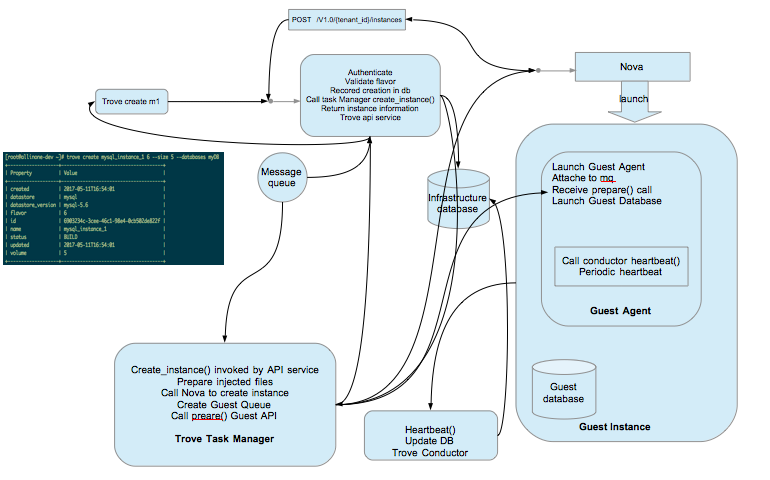
查看实例
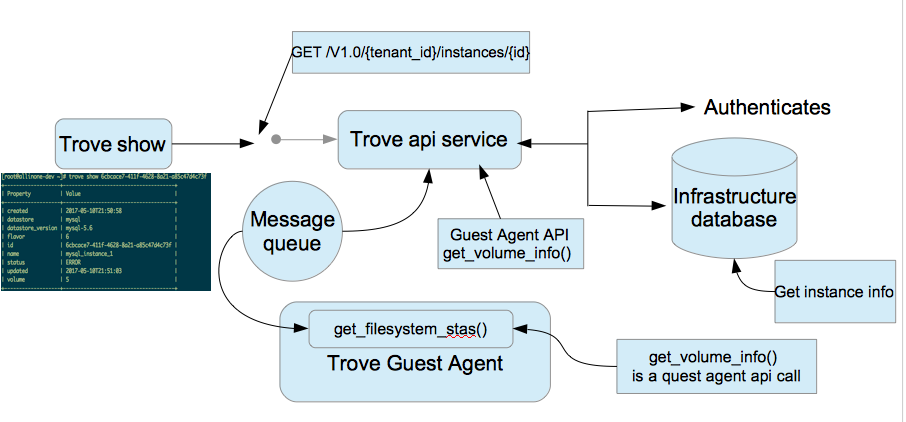
# trove create mysql d1 --size 1 --datastore mysql4 --datastore_version mysql-5.6  --nic net-id=1bf5060b-1b7e-4c7c-8e91-61c680a99a42
+-------------------------+--------------------------------------+
| Property                | Value                                |
+-------------------------+--------------------------------------+
| created                 | 2017-05-22T06:41:27                  |
| datastore               | mysql4                               |
| datastore_version       | mysql-5.6                            |
| encrypted_rpc_messaging | True                                 |
| flavor                  | d1                                   |
| id                      | 0263a394-5b89-4a74-81fc-61e1820b86ea |
| name                    | mysql                                |
| region                  | RegionOne                            |
| server_id               | None                                 |
| status                  | BUILD                                |
| tenant_id               | 1b526b2fbc3c4efa9594d613fb8680ca     |
| updated                 | 2017-05-22T06:41:27                  |
| volume                  | 1                                    |
| volume_id               | None                                 |
+-------------------------+--------------------------------------+

note: after about a few minutes, it will turn to ACTIVE (as the devstack image we used will install guest agent when vm boot),

# trove list
+--------------------------------------+-------+-----------+-------------------+--------+-----------+------+-----------+
| ID                                   | Name  | Datastore | Datastore Version | Status | Flavor ID | Size | Region    |
+--------------------------------------+-------+-----------+-------------------+--------+-----------+------+-----------+
| 0263a394-5b89-4a74-81fc-61e1820b86ea | mysql | mysql4    | mysql-5.6         | ACTIVE | d1        |    1 | RegionOne |
+--------------------------------------+-------+-----------+-------------------+--------+-----------+------+-----------+

Note:
then, use nova show to get the IP address of the vm, and associate a floatingip to it if we want to login the vm, or use mysql client to connect to it.
重启实例
trove restart 只重启运行在由trove 管理的nova实例中的数据库服务,不会重启nova实例。
强制删除
# trove force-delete mysql-master-slave
重置状态
Problem:
As we know, trove will boot a server with status ‘BUILD’ waiting for heartbeat from trove-guestagent to update its status. But in some cases, trove-conductor did not update the state, for example, instance build error, trove-guestagent not work, or network problem and so on. When the state is ‘BUILD’, we can not delete the server through trove API and which may also effect tenant quota usage.
Solution:
nova and cinder have the same problem. They use ‘reset-state’ to change the status in database. We can support ‘reset-state’ in trove API and troveclient to make it possible to update server status manually. Currently no instance can be deleted if the instance staus is in BUILD. This status is the result of the task status being BUILDING, which can be left in that state in case of an error. So in order to delete instances stuck in this state we can reset the task status to NONE which will allow the delete call to go through successfully.
# trove reset-status mysql-master-slave2
更新之后,变成了error
databases,users 操作
# trove database-create 0263a394-5b89-4a74-81fc-61e1820b86ea db-dxl

# trove user-create 0263a394-5b89-4a74-81fc-61e1820b86ea dxl-user password --databases db-dxl

# trove database-list  0263a394-5b89-4a74-81fc-61e1820b86ea
+--------+
| Name   |
+--------+
| db-dxl |
+--------+

# trove user-list  0263a394-5b89-4a74-81fc-61e1820b86ea
+----------+------+-----------+
| Name     | Host | Databases |
+----------+------+-----------+
| dxl-user | %    | db-dxl    |
+----------+------+-----------+

# trove user-show-access 0263a394-5b89-4a74-81fc-61e1820b86ea dxl-user
+--------+
| Name   |
+--------+
| db-dxl |
+--------+

# mysql -udxl-user -h172.24.4.3 -p
Enter password:
Welcome to the MariaDB monitor.  Commands end with ; or \g.
Your MySQL connection id is 45
Server version: 5.6.33-0ubuntu0.14.04.1 (Ubuntu)

Copyright (c) 2000, 2015, Oracle, MariaDB Corporation Ab and others.

Type 'help;' or '\h' for help. Type '\c' to clear the current input statement.

MySQL [(none)]> show databases;
+--------------------+
| Database           |
+--------------------+
| information_schema |
| db-dxl             |
+--------------------+
2 rows in set (0.01 sec)
MySQL [(none)]> quit
Bye
root user 操作
# trove root-show  mysql
+-----------------+-------+
| Property        | Value |
+-----------------+-------+
| is_root_enabled | False |
+-----------------+-------+
[root@allinone-devstack ~]# trove root-enable mysql
+----------+--------------------------------------+
| Property | Value                                |
+----------+--------------------------------------+
| name     | root                                 |
| password | cgHYTaza8EIaEiewi6L8PlPCTmZl9ISq71qi |
+----------+--------------------------------------+
# mysql -uroot -h172.24.4.3 -p
Enter password:
Welcome to the MariaDB monitor.  Commands end with ; or \g.
Your MySQL connection id is 78
Server version: 5.6.33-0ubuntu0.14.04.1 (Ubuntu)

Copyright (c) 2000, 2015, Oracle, MariaDB Corporation Ab and others.

Type 'help;' or '\h' for help. Type '\c' to clear the current input statement.

MySQL [(none)]> show databases;
+--------------------+
| Database           |
+--------------------+
| information_schema |
| db-dxl             |
| db-dxl2            |
| mysql              |
| performance_schema |
+--------------------+
5 rows in set (0.01 sec)

MySQL [(none)]> quit
Bye
默认启用root 用户
trove.conf

[mysql]
root_on_create = True
管理用户的访问权限
# trove user-show-access <instance> <user>
# trove user-grant-access <instance> <user> <database>

# 撤销用户的访问权限
# trove user-revoke-access <instance> <user> <database>
备份操作
trove 本身不进行备份和恢复,它依赖于特定的数据库执行备份和恢复操作命令实现的策略。
trove_guestagent.config中可以对其进行配置:
[mysql]
# For mysql, the following are the defaults for backup, and restore:
# backup_strategy = InnoBackupEx
# backup_namespace = trove.guestagent.strategies.backup.mysql_impl
# restore_namespace = trove.guestagent.strategies.restore.mysql_impl

# Default configuration for mysql replication
# replication_strategy = MysqlBinlogReplication
# replication_namespace = trove.guestagent.strategies.replication.mysql_binlog
# replication_user = slave_user
# replication_password = slave_password
备份存储,默认是保存在swift中
# ========== Default Storage Options for backup ==========

# Default configuration for storage strategy and storage options
# for backups

# For storage to Swift, use the following as defaults:
# storage_strategy = SwiftStorage
# storage_namespace = trove.common.strategies.storage.swift

# Default config options for storing backups to swift
# backup_swift_container = database_backups
# backup_use_gzip_compression = True
# backup_use_openssl_encryption = True
# backup_aes_cbc_key = "default_aes_cbc_key"
# backup_use_snet = False
# backup_chunk_size = 65536
# backup_segment_max_size = 2147483648
创建备份
# trove backup-create 0263a394-5b89-4a74-81fc-61e1820b86ea mysql-backup
+-------------+--------------------------------------------------------------------------------------------------------+
| Property    | Value                                                                                                  |
+-------------+--------------------------------------------------------------------------------------------------------+
| created     | 2017-05-22T06:55:57                                                                                    |
| datastore   | {u'version': u'mysql-5.6', u'type': u'mysql4', u'version_id': u'ac69ad8a-a29b-4155-961e-8ff0fc15d3c2'} |
| description | None                                                                                                   |
| id          | 14a82d64-2356-4f9c-9e2f-500e5295167c                                                                   |
| instance_id | 0263a394-5b89-4a74-81fc-61e1820b86ea                                                                   |
| locationRef | None                                                                                                   |
| name        | mysql-backup                                                                                           |
| parent_id   | None                                                                                                   |
| size        | None                                                                                                   |
| status      | NEW                                                                                                    |
| updated     | 2017-05-22T06:55:57                                                                                    |
+-------------+--------------------------------------------------------------------------------------------------------+
[root@allinone-devstack ~]# trove backup-list
+--------------------------------------+--------------------------------------+--------------+-----------+-----------+---------------------+
| ID                                   | Instance ID                          | Name         | Status    | Parent ID | Updated             |
+--------------------------------------+--------------------------------------+--------------+-----------+-----------+---------------------+
| 14a82d64-2356-4f9c-9e2f-500e5295167c | 0263a394-5b89-4a74-81fc-61e1820b86ea | mysql-backup | COMPLETED | None      | 2017-05-22T06:56:05 |
+--------------------------------------+--------------------------------------+--------------+-----------+-----------+---------------------+
Restore→ 从备份创建instance:
恢复备份是通过启动基于备份的新实例来完成,trove不能加载备份到现有的实例中
# trove create mysql-from-backup ds512M --size 1 --backup 14a82d64-2356-4f9c-9e2f-500e5295167c --datastore mysql4 --datastore_version mysql-5.6 --nic net-id=1bf5060b-1b7e-4c7c-8e91-61c680a99a42
+-------------------------+--------------------------------------+
| Property                | Value                                |
+-------------------------+--------------------------------------+
| created                 | 2017-05-22T07:02:06                  |
| datastore               | mysql4                               |
| datastore_version       | mysql-5.6                            |
| encrypted_rpc_messaging | True                                 |
| flavor                  | d1                                   |
| id                      | 4777c25c-e2fa-42ae-88c0-dc36dbaa1210 |
| name                    | mysql-from-backup                    |
| region                  | RegionOne                            |
| server_id               | None                                 |
| status                  | BUILD                                |
| tenant_id               | 1b526b2fbc3c4efa9594d613fb8680ca     |
| updated                 | 2017-05-22T07:02:06                  |
| volume                  | 1                                    |
| volume_id               | None                                 |
+-------------------------+--------------------------------------+

# trove database-list mysql-from-backup
+--------+
| Name   |
+--------+
| db-dxl |
+--------+
# trove user-list mysql-from-backup
+----------+------+-----------+
| Name     | Host | Databases |
+----------+------+-----------+
| dxl-user | %    | db-dxl    |
+----------+------+-----------+
增量备份
# trove backup-create 0263a394-5b89-4a74-81fc-61e1820b86ea  mysql-backup2  --parent 14a82d64-2356-4f9c-9e2f-500e5295167c --incremental --description "backup after create two databases"
+-------------+--------------------------------------------------------------------------------------------------------+
| Property    | Value                                                                                                  |
+-------------+--------------------------------------------------------------------------------------------------------+
| created     | 2017-05-22T07:12:58                                                                                    |
| datastore   | {u'version': u'mysql-5.6', u'type': u'mysql4', u'version_id': u'ac69ad8a-a29b-4155-961e-8ff0fc15d3c2'} |
| description | backup after create two databases                                                                      |
| id          | 5a07d741-8e33-4918-bb6d-565dc017fb18                                                                   |
| instance_id | 0263a394-5b89-4a74-81fc-61e1820b86ea                                                                   |
| locationRef | None                                                                                                   |
| name        | mysql-backup2                                                                                          |
| parent_id   | 14a82d64-2356-4f9c-9e2f-500e5295167c                                                                   |
| size        | None                                                                                                   |
| status      | NEW                                                                                                    |
| updated     | 2017-05-22T07:12:58                                                                                    |
+-------------+--------------------------------------------------------------------------------------------------------+

# trove backup-list
+--------------------------------------+--------------------------------------+---------------+-----------+--------------------------------------+---------------------+
| ID                                   | Instance ID                          | Name          | Status    | Parent ID                            | Updated             |
+--------------------------------------+--------------------------------------+---------------+-----------+--------------------------------------+---------------------+
| 14a82d64-2356-4f9c-9e2f-500e5295167c | 0263a394-5b89-4a74-81fc-61e1820b86ea | mysql-backup  | COMPLETED | None                                 | 2017-05-22T06:56:05 |
| 5a07d741-8e33-4918-bb6d-565dc017fb18 | 0263a394-5b89-4a74-81fc-61e1820b86ea | mysql-backup2 | COMPLETED | 14a82d64-2356-4f9c-9e2f-500e5295167c | 2017-05-22T07:13:07 |
+--------------------------------------+--------------------------------------+---------------+-----------+--------------------------------------+---------------------+
note: 删除备份时,当删除父备份时,子备份会自动删除。
副本(replications)操作
trove 提供了一个内部框架,使数据库可以实现和管理自己的本地副本功能。trove本身不执行复制功能,由底层数据库服务执行。
trove仅仅执行如下内容:
- 配置并建立备份
- 维护信息来帮助识别备份集中的成员
- 如果有需要,则执行故障切换等操作。
trove 基于现有实例生成副本的过程:首先生成源的快照(主),然后使用源快照启动副本。快照是一个备份,和trove backup-create 命令生成的备份一样。一旦基于快照启动副本实例,则复制策略将执行命令来配置复制的副本连接到主节点,这些命令取决于复制策略基于binlog,还是GTID。
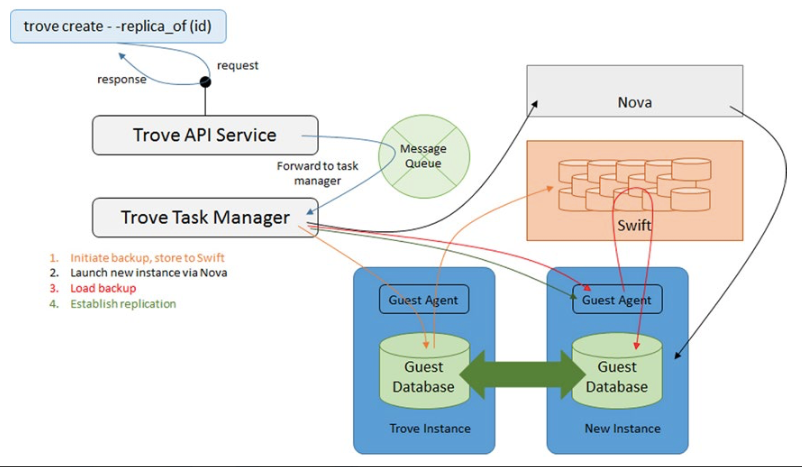
复制策略包含一些优化项以使用最少时间启动一个副本,包括使用现有的快照作为基础生成增量快照,由创建实例时指定–backup 和 –replica-of 参数指定。
查看master,slave 状态
连接slave 节点:
# mysql -uroot -h172.24.4.9 -p
Enter password:
Welcome to the MariaDB monitor.  Commands end with ; or \g.
Your MySQL connection id is 61
Server version: 5.6.33-0ubuntu0.14.04.1-log (Ubuntu)

Copyright (c) 2000, 2015, Oracle, MariaDB Corporation Ab and others.

Type 'help;' or '\h' for help. Type '\c' to clear the current input statement.

MySQL [(none)]> show master status;
+------------------+----------+--------------+------------------+-------------------------------------------------------------------------------------+
| File             | Position | Binlog_Do_DB | Binlog_Ignore_DB | Executed_Gtid_Set                                                                   |
+------------------+----------+--------------+------------------+-------------------------------------------------------------------------------------+
| mysql-bin.000002 |     2441 |              |                  | 35ae53fc-3eba-11e7-b139-fa163eaefcd7:1-15,
4d51f27a-3ec3-11e7-b174-fa163eb0dc67:1-5 |
+------------------+----------+--------------+------------------+-------------------------------------------------------------------------------------+
1 row in set (0.00 sec)

MySQL [(none)]> show variables like 'server%';
+----------------+--------------------------------------+
| Variable_name  | Value                                |
+----------------+--------------------------------------+
| server_id      | 1660885888                           |
| server_id_bits | 32                                   |
| server_uuid    | 4d51f27a-3ec3-11e7-b174-fa163eb0dc67 |
+----------------+--------------------------------------+
3 rows in set (0.01 sec)

连接master节点:
# mysql -uroot -h172.24.4.3 -p
Enter password:
Welcome to the MariaDB monitor.  Commands end with ; or \g.
Your MySQL connection id is 67
Server version: 5.6.33-0ubuntu0.14.04.1-log (Ubuntu)

Copyright (c) 2000, 2015, Oracle, MariaDB Corporation Ab and others.

Type 'help;' or '\h' for help. Type '\c' to clear the current input statement.

MySQL [(none)]> show slave hosts;
+------------+------+------+-----------+--------------------------------------+
| Server_id  | Host | Port | Master_id | Slave_UUID                           |
+------------+------+------+-----------+--------------------------------------+
| 1660885888 |      | 3306 | 502962585 | 4d51f27a-3ec3-11e7-b174-fa163eb0dc67 |
+------------+------+------+-----------+--------------------------------------+
1 row in set (0.01 sec)

MySQL [(none)]> show variables like 'server%';
+----------------+--------------------------------------+
| Variable_name  | Value                                |
+----------------+--------------------------------------+
| server_id      | 502962585                            |
| server_id_bits | 32                                   |
| server_uuid    | 35ae53fc-3eba-11e7-b139-fa163eaefcd7 |
+----------------+--------------------------------------+
3 rows in set (0.01 sec)
Note:
删除master 实例时,如果实例上有副本,需要先将副本detach,然后再删除。
主从切换(failover)
故障切换
在master-slave 环境中,我们有一个主节点和一个或者多个副本。有可能用户会从目前可用的副本中选出新的主节点,这个过程称之为故障切换。
有三个命令可以来管理主节点和副本:detach-replica, eject-replica-source, promote-to-replica-source
有序故障切换
正常强况下,可以使用 promote-to-replica-source 来替换当前的主节点。
实例将过渡到PROMOTE 状态,几分钟后恢复ACTIVE
打破主节点和副本之间的复制的另一种方法是将副本从其主节点上分离,这是不可逆的操作,通常用于在一个时间点生成一个数据集的备份,并且可以随后用于生成该时间点的新实例。
主节点失败的故障切换
使用 eject-replica-source 来处理主节点失败的情况。当对一个失败的主节点执行该命令时,会将该主节点抛弃并选出新的节点。
note:
执行该命令时,不能针对一个不是副本源的实例来操作;
该命令,不允许抛弃一个有最近心跳的主节点。
在遇到failure时,可以通过detach-replica 和 promte-to-replica-source 来进行主从切换
日志操作
log-list
# trove log-list mysql
+------------+------+-------------+-----------+---------+-----------+--------+
| Name       | Type | Status      | Published | Pending | Container | Prefix |
+------------+------+-------------+-----------+---------+-----------+--------+
| error      | SYS  | Unavailable |         0 |       0 | None      | None   |
| general    | USER | Disabled    |         0 |       0 | None      | None   |
| guest      | SYS  | Ready       |         0 |  394573 | None      | None   |
| slow_query | USER | Disabled    |         0 |       0 | None      | None   |
+------------+------+-------------+-----------+---------+-----------+--------+
name: log 模块的名字
        error: 对应的是guest中 /var/log/mysqld.log
        general:
# cat ./conf.d/10-system-002-enable_general_log.cnf
[mysqld]
general_log = on
log_output = file
general_log_file = /var/lib/mysql/mysql-general.log
        slow_query:
# cat /etc/mysql/conf.d/10-system-001-enable_slow_query_log.cnf
[mysqld]
slow_query_log_file = /var/lib/mysql/mysql-slow_query.log
slow_query_log = on
long_query_time = 1
       guest:
def guestagent_log_defs(self):
    """These are log files that should be available on every Trove
 instance. By definition, these should be of type LogType.SYS
 """
 log_dir = CONF.get('log_dir', '/var/log/trove/')
    log_file = CONF.get('log_file', 'trove-guestagent.log')
    guestagent_log = guestagent_utils.build_file_path(log_dir, log_file)
    return {
        self.GUEST_LOG_DEFS_GUEST_LABEL: {
            self.GUEST_LOG_TYPE_LABEL: guest_log.LogType.SYS,
 self.GUEST_LOG_USER_LABEL: None,
 self.GUEST_LOG_FILE_LABEL: guestagent_log,
 },
 }
type:SYS: 系统log,总是开启;USER: 用户管理的log
status:
        Disabled: USER log 的初始化状态
        Enabled: SYS log 的初始化状态,或者用户log,但是没有数据
        Unavailable: SYS log,并且没有数据
       Ready: 含有数据的log,并且可以被publish
       Published: log 文件已经完全被发布。
       Partial: log 文件部分被发布
       Rotated: log 文件已经被轮转,下次发布将会先删掉container
       Restart Required: 数据库需要重启才能开始写log文件
      Restart Completed: 内部状态,Internal state so the guest log knows to begin reporting the actual state again
Published:  被发布到container的数据的数量
Pending:可以通过log-publish发布的log的数量
Container: 保存log的swift container
prefix: 发送给swfit 的前缀,可以得到相关的log
container 和prefix 为none,表明log没有被log-publish 操作发布。
log-show log-enable log-disable log-discard log-save log-tail
[root@allinone ~]# trove log-tail --lines 5 percona2 guest
ERROR: No published 'guest' log was found for <Instance created=2017-05-24T06:10:35, datastore={u'version': u'percona-5.6', u'type': u'percona'}, encrypted_rpc_messaging=True, flavor={u'id': u'7', u'links': [{u'href': u'https://192.168.1.56:8779/v1.0/5682ce3aab014593bde9739bf259c771/flavors/7', u'rel': u'self'}, {u'href': u'https://192.168.1.56:8779/flavors/7', u'rel': u'bookmark'}]}, id=5410c2a5-0e52-432d-bf18-51c7b9951035, ip=[u'10.0.0.12', u'172.24.4.7'], links=[{u'href': u'https://192.168.1.56:8779/v1.0/5682ce3aab014593bde9739bf259c771/instances/5410c2a5-0e52-432d-bf18-51c7b9951035', u'rel': u'self'}, {u'href': u'https://192.168.1.56:8779/instances/5410c2a5-0e52-432d-bf18-51c7b9951035', u'rel': u'bookmark'}], name=percona2, region=RegionOne, server_id=59d755ed-949e-47d0-81f4-0b84c1603cf2, status=ACTIVE, updated=2017-05-24T06:10:43, volume={u'used': 0.1, u'size': 1}, volume_id=b5f4abb4-8d81-47e5-91ed-6532c91a9da6>.
[root@allinone ~]# trove log-tail --lines 5 percona2 slow_query
/usr/sbin/mysqld, Version: 5.6.33-79.0-log (Percona Server (GPL), Release 79.0, Revision 2084bdb). started with:
Tcp port: 3306  Unix socket: /var/run/mysqld/mysqld.sock
Time                 Id Command    Argument
配置组操作
在启动 guest agent 的过程中,trove task manager 为guest 生成了一个配置文件(/etc/trove/templates/),并通过prepare()调用提供给调用的guest. 定制模版是修改一个guest实例的配置的一种方式。 上面,在配置数据库类型和版本的时候,我们已经注册了mysql数据库的默认配置参数,可以通过以下命令暴露出来: 关于这些mysql的配置参数信息,可以在mysql 的文档中找到。
# trove configuration-parameter-list mysql-5.6 --datastore mysql4
+--------------------------------+---------+----------+----------------------+------------------+
| Name                           | Type    | Min Size |             Max Size | Restart Required |
+--------------------------------+---------+----------+----------------------+------------------+
| auto_increment_increment       | integer |        1 |                65535 |            False |
| auto_increment_offset          | integer |        1 |                65535 |            False |
| autocommit                     | integer |        0 |                    1 |            False |
| bulk_insert_buffer_size        | integer |        0 | 18446744073709551615 |            False |
| character_set_client           | string  |        - |                    - |            False |
| character_set_connection       | string  |        - |                    - |            False |
| character_set_database         | string  |        - |                    - |            False |
| character_set_filesystem       | string  |        - |                    - |            False |
| character_set_results          | string  |        - |                    - |            False |
| character_set_server           | string  |        - |                    - |            False |
| collation_connection           | string  |        - |                    - |            False |
| collation_database             | string  |        - |                    - |            False |
| collation_server               | string  |        - |                    - |            False |
| connect_timeout                | integer |        2 |             31536000 |            False |
| expire_logs_days               | integer |        0 |                   99 |            False |
| innodb_buffer_pool_size        | integer |  5242880 | 18446744073709551615 |             True |
| innodb_file_per_table          | integer |        0 |                    1 |            False |
| innodb_flush_log_at_trx_commit | integer |        0 |                    2 |            False |
| innodb_log_buffer_size         | integer |   262144 |           4294967295 |             True |
| innodb_open_files              | integer |       10 |           4294967295 |             True |
| innodb_thread_concurrency      | integer |        0 |                 1000 |            False |
| interactive_timeout            | integer |        1 |                65535 |            False |
| join_buffer_size               | integer |      128 | 18446744073709547520 |            False |
| key_buffer_size                | integer |        8 |           4294967295 |            False |
| local_infile                   | integer |        0 |                    1 |            False |
| long_query_time                | float   |        0 |                    - |            False |
| lower_case_table_names         | integer |        0 |                    2 |             True |
| max_allowed_packet             | integer |     1024 |           1073741824 |            False |
| max_connect_errors             | integer |        1 | 18446744073709551615 |            False |
| max_connections                | integer |        1 |               100000 |            False |
| max_prepared_stmt_count        | integer |        0 |              1048576 |            False |
| max_user_connections           | integer |        0 |           4294967295 |            False |
| myisam_sort_buffer_size        | integer |     4096 | 18446744073709551615 |            False |
| performance_schema             | boolean |        - |                    - |             True |
| server_id                      | integer |        0 |           4294967295 |            False |
| sort_buffer_size               | integer |    32768 | 18446744073709551615 |            False |
| sync_binlog                    | integer |        0 |           4294967295 |            False |
| wait_timeout                   | integer |        1 |             31536000 |            False |
+--------------------------------+---------+----------+----------------------+------------------+
接下来演示配置组操作: 第一步:创建一个mysql 5.6 的实例 第二步:使用trove configuration-default 来查看实例的默认配置,当实例应用了新的配置组时,此命令得到的结果仍然不变。
# trove configuration-default db53ec0c-0789-4b73-b91b-02e2a0fef553
+---------------------------+-----------------------------+
| Property                  | Value                       |
+---------------------------+-----------------------------+
| basedir                   | /usr                        |
| connect_timeout           | 15                          |
| datadir                   | /var/lib/mysql/data         |
| default_storage_engine    | innodb                      |
| innodb_buffer_pool_size   | 150M                        |
| innodb_data_file_path     | ibdata1:10M:autoextend      |
| innodb_file_per_table     | 1                           |
| innodb_log_buffer_size    | 25M                         |
| innodb_log_file_size      | 50M                         |
| innodb_log_files_in_group | 2                           |
| join_buffer_size          | 1M                          |
| key_buffer_size           | 50M                         |
| local-infile              | 0                           |
| max_allowed_packet        | 1024K                       |
| max_connections           | 100                         |
| max_heap_table_size       | 16M                         |
| max_user_connections      | 100                         |
| myisam-recover-options    | BACKUP,FORCE                |
| open_files_limit          | 512                         |
| performance_schema        | ON                          |
| pid-file                  | /var/run/mysqld/mysqld.pid  |
| port                      | 3306                        |
| query_cache_limit         | 1M                          |
| query_cache_size          | 8M                          |
| query_cache_type          | 1                           |
| read_buffer_size          | 512K                        |
| read_rnd_buffer_size      | 512K                        |
| server_id                 | 1656441325                  |
| skip-external-locking     | 1                           |
| socket                    | /var/run/mysqld/mysqld.sock |
| sort_buffer_size          | 1M                          |
| table_definition_cache    | 256                         |
| table_open_cache          | 256                         |
| thread_cache_size         | 4                           |
| thread_stack              | 192K                        |
| tmp_table_size            | 16M                         |
| tmpdir                    | /var/tmp                    |
| user                      | mysql                       |
| wait_timeout              | 120                         |
+---------------------------+-----------------------------+
第三步:假设想将一组实例的 wait_timeout 设置为240s,max_connections等于 200
第四步:创建新配置的配置组
# trove configuration-create special-config '{"wait_timeout": 240, "max_connections": 200}' --description "test config group" --datastore mysql4 --datastore_version mysql-5.6
+------------------------+-------------------------------------------------+
| Property               | Value                                           |
+------------------------+-------------------------------------------------+
| created                | 2017-05-23T01:58:09                             |
| datastore_name         | mysql4                                          |
| datastore_version_id   | ac69ad8a-a29b-4155-961e-8ff0fc15d3c2            |
| datastore_version_name | mysql-5.6                                       |
| description            | test config group                               |
| id                     | cfd4eb2c-2e75-4db8-b0bc-6da63d40aa01            |
| instance_count         | 0                                               |
| name                   | special-config                                  |
| updated                | 2017-05-23T01:58:09                             |
| values                 | {u'wait_timeout': 240, u'max_connections': 200} |
+------------------------+-------------------------------------------------+
第五步:将配置关联到实例上(可以关联多个)
# trove configuration-attach db53ec0c-0789-4b73-b91b-02e2a0fef553 cfd4eb2c-2e75-4db8-b0bc-6da63d40aa01
查看使用指定配置组的实例列表:
# trove configuration-instances cfd4eb2c-2e75-4db8-b0bc-6da63d40aa01
+--------------------------------------+-------+
| ID                                   | Name  |
+--------------------------------------+-------+
| db53ec0c-0789-4b73-b91b-02e2a0fef553 | msql1 |
+--------------------------------------+-------+
修改配置需要重启生效的话,实例的状态会变成RESTART_REQUIRED,restart 后变成 REBOOT状态,等待ACTIVE之后会发现配置已生效。
[root@allinone ~(keystone_admin)]# trove configuration-patch special-config '{ "innodb_open_files": 514}'
[root@allinone ~(keystone_admin)]# trove list
+--------------------------------------+----------------+-----------+-------------------+------------------+-----------+------+-----------+
| ID                                   | Name           | Datastore | Datastore Version | Status           | Flavor ID | Size | Region    |
+--------------------------------------+----------------+-----------+-------------------+------------------+-----------+------+-----------+
| 9d12b4b8-d5cf-4c86-a1c9-f26fb1f79ec7 | percon1        | percona   | percona-5.6       | RESTART_REQUIRED | 7         |    1 | RegionOne |
| d0ec0384-8146-42d2-b68e-8b202e5c45c7 | percon1-mirror | percona   | percona-5.6       | ACTIVE           | 7         |    1 | RegionOne |
+--------------------------------------+----------------+-----------+-------------------+------------------+-----------+------+-----------+
[root@allinone ~(keystone_admin)]# trove restart percon1
[root@allinone ~(keystone_admin)]# trove list
+--------------------------------------+----------------+-----------+-------------------+--------+-----------+------+-----------+
| ID                                   | Name           | Datastore | Datastore Version | Status | Flavor ID | Size | Region    |
+--------------------------------------+----------------+-----------+-------------------+--------+-----------+------+-----------+
| 9d12b4b8-d5cf-4c86-a1c9-f26fb1f79ec7 | percon1        | percona   | percona-5.6       | REBOOT | 7         |    1 | RegionOne |
| d0ec0384-8146-42d2-b68e-8b202e5c45c7 | percon1-mirror | percona   | percona-5.6       | ACTIVE | 7         |    1 | RegionOne |
+--------------------------------------+----------------+-----------+-------------------+--------+-----------+------+-----------+
第六步:连接到实例并查询被修改的系统参数,确认是否修改成功。
# mysql -uroot -pBTnNva6hSUzNV7usuZZHPCUuYymNqVqhlLFI -h172.24.4.9
Welcome to the MariaDB monitor.  Commands end with ; or \g.
Your MySQL connection id is 109
Server version: 5.6.33-0ubuntu0.14.04.1 (Ubuntu)

Copyright (c) 2000, 2015, Oracle, MariaDB Corporation Ab and others.

Type 'help;' or '\h' for help. Type '\c' to clear the current input statement.

MySQL [(none)]> select @@global.wait_timeout;
+-----------------------+
| @@global.wait_timeout |
+-----------------------+
|                   240 |
+-----------------------+
1 row in set (0.00 sec)


MySQL [(none)]> select @@global.max_connections;
+--------------------------+
| @@global.max_connections |
+--------------------------+
|                      200 |
+--------------------------+
1 row in set (0.00 sec)

MySQL [(none)]> quit
Bye
第七步:配置分离
# trove configuration-detach db53ec0c-0789-4b73-b91b-02e2a0fef553
检查结果
# mysql -uroot -pBTnNva6hSUzNV7usuZZHPCUuYymNqVqhlLFI -h172.24.4.9
Welcome to the MariaDB monitor.  Commands end with ; or \g.
Your MySQL connection id is 116
Server version: 5.6.33-0ubuntu0.14.04.1 (Ubuntu)

Copyright (c) 2000, 2015, Oracle, MariaDB Corporation Ab and others.

Type 'help;' or '\h' for help. Type '\c' to clear the current input statement.

MySQL [(none)]> select @@global.wait_timeout;
+-----------------------+
| @@global.wait_timeout |
+-----------------------+
|                   120 |
+-----------------------+
1 row in set (0.00 sec)

MySQL [(none)]> select @@global.max_connections;
+--------------------------+
| @@global.max_connections |
+--------------------------+
|                      100 |
+--------------------------+
1 row in set (0.00 sec)
第八步:配置打补丁 通过修改配置参数中的一个来给配置打补丁
# trove configuration-patch cfd4eb2c-2e75-4db8-b0bc-6da63d40aa01 '{"max_connections": 300}'
或者
# trove configuration-update special-config '{"wait_timeout": 500, "max_connections": 600}'
都可以做到更改实例上的配置项。 查看结果
MySQL [(none)]> select @@global.max_connections;
+--------------------------+
| @@global.max_connections |
+--------------------------+
|                      300 |
+--------------------------+
1 row in set (0.02 sec)
Note:
- 一个数据库实例是否必须关联且只能关联一个参数模板
- 已经被关联的配置模版不可以删除。
- 数据库实例的参数除了通过模版来更改,也可以设置/etc/trove/templates/ 目录下mysql的初始化配置文件(/opt/stack/trove/trove/templates/mysql/config.template)来修改guest 实例的配置。可以修改单个参数,修改已经关联的数据库实例的配置组,不会自动应用,需要在页面上直接 apply changes操作,其对应trove configuration-patch 命令。
- 一主一备,给主节点设置参数模版后,不会自动设置备节点,需要手动同时设置。
trove 实例性能测试
#!/bin/bash

for i in `ls ~/scripts`; do
    echo ----------------------$i------------------ >>test_result.txt
    SYSBENCH="sysbench /usr/share/sysbench/$i \
               --db-driver=mysql \
               --mysql-user=int32bit_root \
               --mysql-host=rm-2zea16ws7bwstofp2.mysql.rds.aliyuncs.com \
               --mysql-password=int32bit!@# \
               --mysql-db=int32bit \
               --tables=6 \
               --table-size=100000 \
               --report-interval=10 \
               --threads=16 \
               --time=60"
    $SYSBENCH prepare >/dev/null

    $SYSBENCH run >>test_result.txt

    $SYSBENCH cleanup >/dev/null
done
References
module-management
module-mangement-ordering
datastore-log-operation
log
log-operation
Others
Trove: http://markmail.org/message/36lkyacftu5geqcf 备份:sudo cat /var/lib/redis/dump.rdb | gzip | openssl enc -aes-256-cbc -salt -pass pass:default_aes_cbc_key
| 恢复:openssl enc -d -aes-256-cbc -salt -pass pass:default_aes_cbc_key | gzip -d -c | tee /var/lib/redis/dump.rdb |
-
trove 和sahara 集成:https://www.openstack.org/summit/sydney-2017/vote-for-speakers#/19662 t2cloud
-
trove 和 telemetry 和elasticsearch 一起,监控数据,用es分析log,grafana 显示: https://www.openstack.org/summit/sydney-2017/vote-for-speakers#/19934 easystack
metadata:
- https://blueprints.launchpad.net/horizon/+spec/trove-metadata-support
- https://blueprints.launchpad.net/trove/+spec/trove-metadata
- https://review.openstack.org/#/c/82123/
- https://etherpad.openstack.org/p/trove-kilo-sprint-metadata
-
https://wiki.openstack.org/wiki/Trove-Instance-Metadata
- user-guide: Trove CLI: https://docs.openstack.org/user-guide/trove-manage-db.html
- admin-guide for database: https://docs.openstack.org/admin-guide/database.html
- developer doc: https://docs.openstack.org/developer/trove/
- install guide: https://docs.openstack.org/project-install-guide/database/ocata/
- trove-api: https://developer.openstack.org/api-ref/database/